
The Thursday afternoon scramble
It is 16:45 on Thursday. The weekly operations call takes place at 10:00 on Friday morning. You open a blank presentation deck, paste in last week's layout, and send a message to the team channel asking everyone to add their slides before tomorrow.
By Friday at 09:55, three people have added bullet points. Two have added nothing. The first twenty minutes of the live meeting are spent waiting for people to open the deck, share their screens, and talk through status updates that could have been read in a fraction of the time.
The problem is rarely that team members dislike being informed. In our view, traditional meeting preparation often forces people to switch contexts, open heavy desktop tools, and format slides during high-focus working hours. When preparation feels like administrative friction, people naturally push it off until the meeting starts.
The limits of replacing meetings with long documents
When remote teams decide to reduce meeting load, the common reaction is to go purely written: cancel the status call entirely and demand that everyone write long weekly updates in a shared document or chat thread.
In our view, this often replaces live meeting fatigue with reading fatigue. Reading multiple lengthy updates across several chat channels can demand significant cognitive effort, while critical risks risk getting buried in long paragraphs of text.
This distinction matters for specific types of work. Asynchronous preparation works remarkably well for recurring operational syncs, weekly department reviews, and cross-functional status updates. It does not work as a complete replacement for deep strategic debate, sensitive personnel conversations, or early-stage creative brainstorming, where live discussion and immediate visual feedback remain essential.
The goal is not to eliminate live meetings entirely. The goal is to separate information gathering from live discussion.
Why live meetings get consumed by status read-outs
Inefficient live sessions are rarely caused by bad intent. They are caused by a lack of structured preparation before the meeting begins.
In Microsoft's 2023 Work Trend Index, knowledge workers surveyed put inefficient meetings at the top of their list of productivity disruptions, ranking them higher than total meeting volume or unclear goals.
Similarly, Atlassian's 2024 research on meeting habits highlighted that meetings and core work no longer fit in the same week for many workers.
Taken together, these findings suggest that team members are not struggling with collaboration itself, but with calendars filled by calls whose sole purpose is status reporting. When information gathering happens during the meeting, the live session becomes an expensive collection mechanism rather than a forum for resolving friction.
Micro-async: collecting input in seconds, not essays
Effective asynchronous preparation relies on small, focused prompts sent directly to where contributors already work. Instead of asking someone to open a desktop presentation editor and design a slide, ask two direct questions that contributors can answer quickly from their phone.
A useful preparation prompt limits the scope of the answer. It asks for three concrete elements: what was accomplished, what is currently blocked, and what requires a decision during Friday's live session.
When prompts are delivered via chat or short notification links, team members can answer while walking between tasks or finishing their day. Because the input format is standardised, the host receives structured data rather than raw text blocks.
A five-day cadence for asynchronous meeting preparation
You can establish a structured async preparation routine using standard calendar invites and chat tools without buying new software.
- 1Monday morning: Define the specific focus of Friday's meeting in the invite description, including the 2-3 decisions that must be made.
- 2Wednesday afternoon: Post two specific questions in your team chat channel (e.g., 'What key metric moved this week?' and 'What item requires a decision on Friday?').
- 3Thursday afternoon: Set a hard deadline for updates. Review the incoming responses and aggregate them into a single agenda document.
- 4Friday 09:00: Hide or compress any status items that marked 'no blocks / no decision needed'. Highlight only the topics flagged for active discussion.
- 5Friday 10:00 (Live meeting): Skip the individual status read-outs entirely. Open the call directly on the first flagged discussion point.
Automating the collection loop with Curact
Running an async preparation routine manually through chat threads requires the host to send reminders, copy text out of messages, and build slides by hand every week. Over time, hosts tire of doing administrative labor and drop the process.
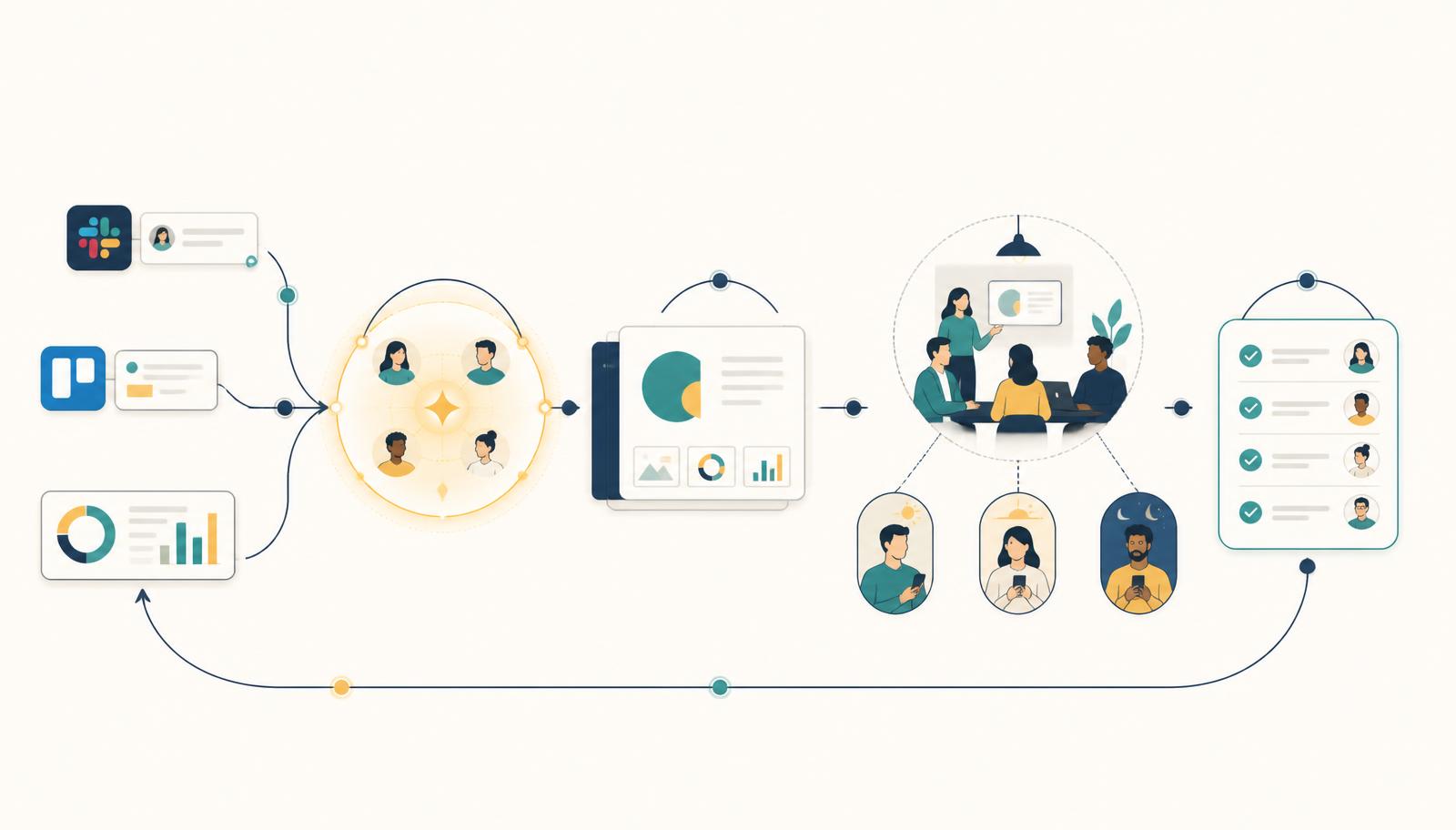
Curact automates this cadence within recurring meeting series. Between sessions, preparation agents prompt designated contributors with personal links sent via Slack or email. Team members submit their updates or KPI changes directly from their phone or browser without building presentation slides.
The meeting host reviews incoming submissions in a unified inbox, accepting updates into the live agenda with one click. When the live session starts, the deck is already organized, and participants join from their phones to vote on open questions rather than listening to people read slides aloud.
Modelling the time recovered from live status updates
To evaluate whether async preparation is worth establishing, model the live time currently spent transferring status information.
Consider a team of 8 people holding a weekly 60-minute operational sync, assuming a fully loaded cost of £60 per hour per attendee. The base live cost of this meeting is £480 per week (£24,960 annually over 52 weeks).
Scenario A (Status read-out model): Assuming 40 minutes of the 60-minute call are spent having attendees verbally present updates while others listen, 5.3 total person-hours per week are dedicated to information transfer (£320 of live time per session).
Scenario B (Async preparation model): Assuming each contributor spends 3 minutes submitting updates via mobile during the week (24 total person-minutes), and the live meeting is shortened to 25 minutes focused strictly on decisions. Total live time drops to 3.3 person-hours per call (£200 of live time per session).
In this scenario, moving information transfer out of the live session reclaims approximately 2 hours of live team time each week while reducing the operational meeting cost by over £6,000 annually.
How to start on Monday
On Monday, review your calendar for your team's next recurring meeting. Edit the agenda to remove general verbal updates, and send a message 24 hours in advance asking contributors to submit two points in writing: their biggest win and their current blocker.
During the call itself, skip everyone who reported no blockers, and spend the time solving the obstacles that were raised.
If you want to automate this collection rhythm across your organization so decks assemble themselves without manual reminders, try Curact.
Sources
- How Atlassian Teams Saved 5,000 Hours of Meeting Time in Two Weeks — Atlassian (2024)Meetings and the work itself no longer fit in the same week.
- Work Trend Index: Will AI Fix Work? — Microsoft (2023)Inefficient meetings are the top productivity complaint at work.
Findings are paraphrased and linked to the publisher. No source text is reproduced.